

Build a settings screen
Use Remix CLI recipes to build, customize, and test a Flutter settings screen
Build Launchpad, a desktop-browser settings screen with a form, save state, dialog, and sidebar. You write the application; the CLI installs editable component recipes and their theme.
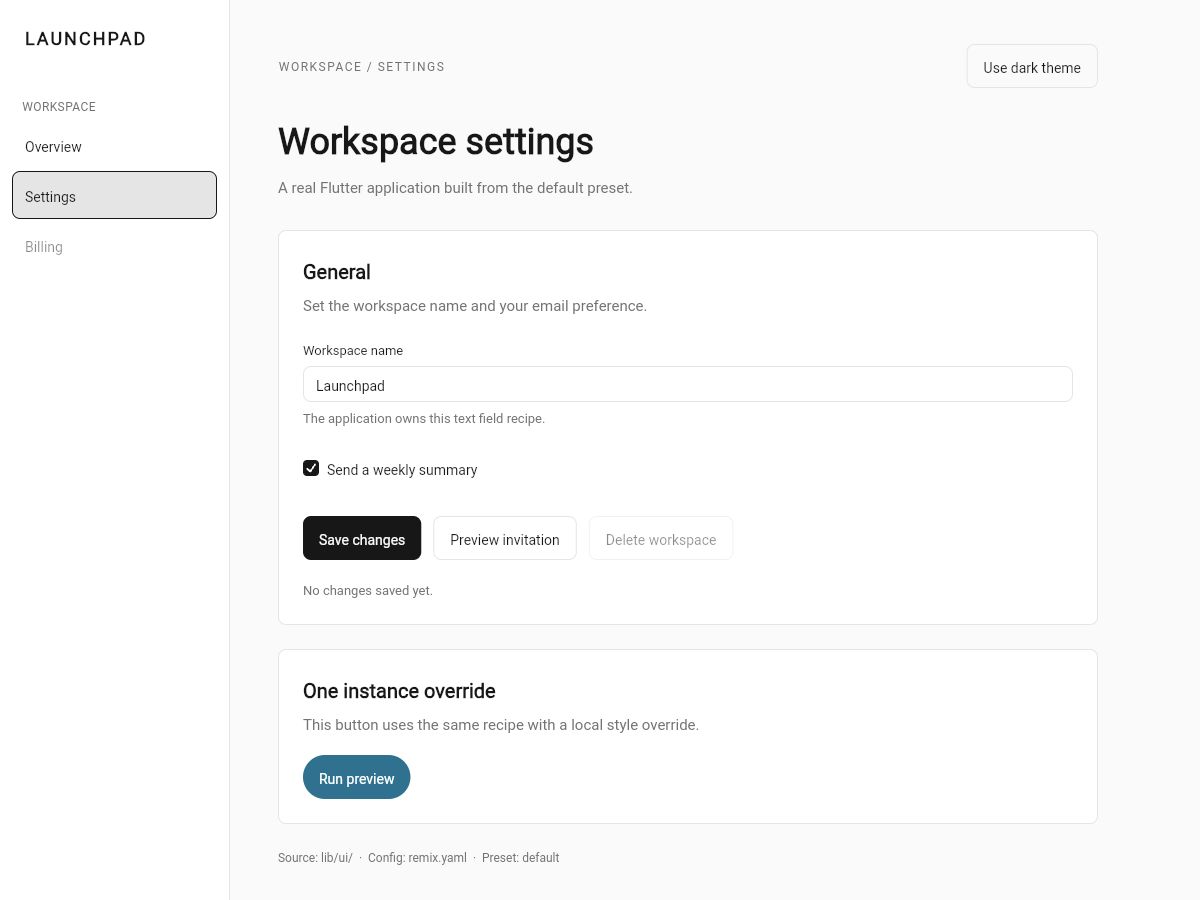
The finished screenshot includes the medium Button height edit below. It is an application example, not a screen the CLI generates for you.
This walkthrough includes the complete application and test source below. The sample download contains both projects, generated adapters, and four behavior tests per preset.
Before you start
Use Flutter 3.44.0, its bundled Dart 3.12.0, Git, and a desktop browser. The samples use local state, with no backend or responsive mobile layout.
The September 7, 2026 captures used checkout
bfae6507676fadea7632e2f7f66924935c04ca2a, with Remix 1.0.0-beta.9 and
CLI 0.1.0. These are recorded checkout versions, not a claim that those
packages are published. Keep the pin when reproducing the screenshots.
That pinned CLI calls the compact preset default; current releases call the
same preset vanilla. The commands below retain default so the recorded
walkthrough remains reproducible.
Prepare the project and CLI
In the directory where you keep applications:
flutter create --empty --platforms=web remix_default_demo
cd remix_default_demo
In a second terminal, get the reviewed Remix checkout:
git clone https://github.com/btwld/remix.git remix-review
git -C remix-review checkout bfae6507676fadea7632e2f7f66924935c04ca2a
git -C remix-review rev-parse --show-toplevel
Use the printed absolute path in place of /path/to/remix below. Back in
remix_default_demo, create pubspec_overrides.yaml:
dependency_overrides:
  remix:
    path: /path/to/remix/packages/remix
Then install the checkout CLI as a project-local development dependency:
dart pub add "dev:remix_cli@{path: /path/to/remix/packages/remix_cli}"
dart run remix_cli:remix --version
The version should be 0.1.0. Keep running CLI commands from the sample's
package root, beside pubspec.yaml.
Initialize and install Button
dart run remix_cli:remix init --prefix Acme --preset defaultAcme controls local names such as AcmeButton and acmeButtonStyle.
Initialization writes remix.yaml and a managed barrel at lib/ui/ui.dart.
It does not install a component yet.
Preview the first install:
dart run remix_cli:remix add button --dry-runThe plan should install theme before button. No source is written by
--dry-run. Install when the plan matches:
dart run remix_cli:remix add buttonInspect lib/ui/components/button.dart, the recipe you own, and
button.g.dart, the adapter produced by the generator. Edit the recipe, not
the generated file. The CLI also adds the required dependencies and exports.
Render the first button
Replace lib/main.dart with this complete example:
import 'package:flutter/widgets.dart';

import 'ui/ui.dart';

void main() => runApp(const AcmeApp());

class AcmeApp extends StatelessWidget {
  const AcmeApp({super.key});

  @override
  Widget build(BuildContext context) {
    return WidgetsApp(
      color: const Color(0xFF000000),
      builder: (_, _) => Overlay(
        initialEntries: [
          OverlayEntry(
            builder: (_) => const AcmeThemeScope(
              theme: AcmeThemeData.light(),
              child: HomePage(),
            ),
          ),
        ],
      ),
    );
  }
}

class HomePage extends StatelessWidget {
  const HomePage({super.key});

  @override
  Widget build(BuildContext context) {
    final theme = AcmeTheme.of(context);
    return ColoredBox(
      color: theme.background,
      child: Center(
        child: AcmeButton.primary(
          label: 'Continue',
          onPressed: () {},
        ),
      ),
    );
  }
}
flutter run -d chrome
You should see Continue centered in the app. Its callback is deliberately empty at this stage. Keep this terminal open; use another terminal in the same sample directory for the remaining CLI commands.
Build the settings screen
Install the remaining recipes, one item per command:
dart run remix_cli:remix add checkbox
dart run remix_cli:remix add textfield
dart run remix_cli:remix add dialog
dart run remix_cli:remix add card
dart run remix_cli:remix add sidebar
dart run remix_cli:remix add sidebar_layout
The existing theme is preserved. Sidebar also installs its toggle and
tooltip dependencies. Sidebar Layout is a plain shell layout — no Spec,
no generated adapter — that pairs an installed sidebar with a header and body,
switching to a start-edge sheet below its compact breakpoint. Each command
updates the barrel and generates the needed adapters.
Replace your application's lib/main.dart with the complete Vanilla source below.
The same file is default_demo/lib/main.dart in the
reviewed samples.
Keep your CLI-installed lib/ui files; the next step changes one of them.
import 'package:flutter/material.dart';
import 'package:remix/remix.dart';
import 'ui/ui.dart';
void main() => runApp(const SampleApp());
class SampleApp extends StatefulWidget {
const SampleApp({super.key});
@override
State<SampleApp> createState() => _SampleAppState();
}
class _SampleAppState extends State<SampleApp> {
AcmeThemeMode mode = AcmeThemeMode.system;
@override
Widget build(BuildContext context) {
return WidgetsApp(
title: 'Launchpad — default preset',
color: const Color(0xFFF8FAFC),
debugShowCheckedModeBanner: false,
pageRouteBuilder: <T>(settings, builder) => PageRouteBuilder<T>(
settings: settings,
pageBuilder: (context, animation, secondaryAnimation) =>
builder(context),
),
builder: (context, child) => AcmeThemeScope(
theme: const AcmeThemeData.light(),
darkTheme: const AcmeThemeData.dark(),
mode: mode,
child: Builder(
builder: (context) {
final dark = AcmeTheme.of(context).brightness == Brightness.dark;
return DefaultTextStyle(
style: TextStyle(
fontSize: 14,
color: dark ? const Color(0xFFF1F1F1) : const Color(0xFF202020),
),
child: child!,
);
},
),
),
home: Builder(
builder: (context) {
final dark = AcmeTheme.of(context).brightness == Brightness.dark;
return WorkspacePage(
dark: dark,
onTheme: () => setState(
() => mode = dark ? AcmeThemeMode.light : AcmeThemeMode.dark,
),
);
},
),
);
}
}
class WorkspacePage extends StatefulWidget {
const WorkspacePage({super.key, required this.dark, required this.onTheme});
final bool dark;
final VoidCallback onTheme;
@override
State<WorkspacePage> createState() => _WorkspacePageState();
}
class _WorkspacePageState extends State<WorkspacePage> {
final name = TextEditingController(text: 'Launchpad');
bool summary = true;
bool saving = false;
int saves = 0;
String destination = 'settings';
String status = 'No changes saved yet.';
@override
void dispose() {
name.dispose();
super.dispose();
}
Future<void> save() async {
setState(() => saving = true);
await Future<void>.delayed(const Duration(milliseconds: 1500));
if (!mounted) return;
setState(() {
saving = false;
saves += 1;
status =
'Saved ${name.text}. Save count: $saves. Summary: ${summary ? 'on' : 'off'}.';
});
}
Future<void> invite() async {
final confirmed = await showRemixDialog<bool>(
context: context,
barrierLabel: 'Close invitation preview',
builder: (context) => Center(
child: AcmeDialog(
title: 'Invite a teammate',
description:
'This sample records your choice locally. It sends no invitation.',
actions: [
AcmeButton.outline(
label: 'Cancel',
onPressed: () => Navigator.pop(context, false),
),
AcmeButton.primary(
label: 'Confirm',
onPressed: () => Navigator.pop(context, true),
),
],
),
),
);
if (confirmed == true && mounted) {
setState(() => status = 'Invitation confirmed in this sample.');
}
}
@override
Widget build(BuildContext context) {
final foreground = widget.dark
? const Color(0xFFFAFAFA)
: const Color(0xFF171717);
final muted = widget.dark
? const Color(0xFFA3A3A3)
: const Color(0xFF737373);
final background = widget.dark
? const Color(0xFF0A0A0A)
: const Color(0xFFFAFAFA);
return DefaultTextStyle(
style: TextStyle(color: foreground, fontSize: 15, height: 1.5),
child: ColoredBox(
color: background,
child: SafeArea(
child: Row(
crossAxisAlignment: CrossAxisAlignment.stretch,
children: [
SizedBox(
width: 230,
child: AcmeSidebar<String>(
semanticLabel: 'Workspace navigation',
header: const Padding(
padding: EdgeInsets.all(24),
child: Text(
'LAUNCHPAD',
style: TextStyle(
fontSize: 18,
fontWeight: FontWeight.w700,
letterSpacing: 2,
),
),
),
sections: const [
RemixSidebarSection(
label: 'WORKSPACE',
destinations: [
RemixSidebarDestination(
value: 'overview',
label: 'Overview',
),
RemixSidebarDestination(
value: 'settings',
label: 'Settings',
),
RemixSidebarDestination(
value: 'billing',
label: 'Billing',
enabled: false,
),
],
),
],
selectedValue: destination,
onSelected: (value) => setState(() => destination = value),
footer: Text(
'default preset\nApplication-owned source',
style: TextStyle(fontSize: 12, color: muted),
),
),
),
Expanded(
child: SingleChildScrollView(
padding: const EdgeInsets.symmetric(
horizontal: 48,
vertical: 44,
),
child: Align(
alignment: Alignment.topLeft,
child: ConstrainedBox(
constraints: const BoxConstraints(maxWidth: 820),
child: Column(
crossAxisAlignment: CrossAxisAlignment.stretch,
children: [
Row(
children: [
Expanded(
child: Text(
'WORKSPACE / ${destination.toUpperCase()}',
style: TextStyle(
color: muted,
fontSize: 12,
letterSpacing: 1.5,
),
),
),
AcmeButton.outline(
label: widget.dark
? 'Use light theme'
: 'Use dark theme',
onPressed: widget.onTheme,
),
],
),
const SizedBox(height: 32),
Text(
destination == 'settings'
? 'Workspace settings'
: 'Workspace overview',
style: const TextStyle(
fontSize: 36,
fontWeight: FontWeight.w600,
height: 1.2,
),
),
const SizedBox(height: 12),
Text(
'A real Flutter application built from the default preset.',
style: TextStyle(color: muted),
),
const SizedBox(height: 32),
AcmeCard(
child: Column(
crossAxisAlignment: CrossAxisAlignment.stretch,
children: [
const Text(
'General',
style: TextStyle(
fontSize: 20,
fontWeight: FontWeight.w600,
),
),
const SizedBox(height: 8),
Text(
'Set the workspace name and your email preference.',
style: TextStyle(color: muted),
),
const SizedBox(height: 24),
AcmeTextField(
controller: name,
label: 'Workspace name',
semanticLabel: 'Workspace name',
helperText:
'The application owns this text field recipe.',
),
const SizedBox(height: 16),
AcmeCheckbox(
label: 'Send a weekly summary',
selected: summary,
onChanged: (value) =>
setState(() => summary = value ?? false),
),
const SizedBox(height: 24),
Wrap(
spacing: 12,
runSpacing: 12,
children: [
AcmeButton.primary(
label: 'Save changes',
loading: saving,
onPressed: save,
),
AcmeButton.outline(
label: 'Preview invitation',
onPressed: invite,
),
AcmeButton.outline(
label: 'Delete workspace',
enabled: false,
onPressed: () => setState(
() => status =
'ERROR: disabled action ran.',
),
),
],
),
const SizedBox(height: 20),
Semantics(
liveRegion: true,
child: Text(
status,
style: TextStyle(
color: muted,
fontSize: 13,
),
),
),
],
),
),
const SizedBox(height: 24),
AcmeCard(
child: Column(
crossAxisAlignment: CrossAxisAlignment.start,
children: [
const Text(
'One instance override',
style: TextStyle(
fontSize: 20,
fontWeight: FontWeight.w600,
),
),
const SizedBox(height: 8),
Text(
'This button uses the same recipe with a local style override.',
style: TextStyle(color: muted),
),
const SizedBox(height: 20),
AcmeButton.primary(
label: 'Run preview',
style: ButtonStyler()
.color(const Color(0xFF0E7490))
.label(.color(const Color(0xFFFFFFFF)))
.onPressed(
ButtonStyler().color(
const Color(0xFF164E63),
),
)
.onHovered(
ButtonStyler().color(
const Color(0xFF155E75),
),
)
.borderRadius(
.all(const Radius.circular(999)),
),
onPressed: () => setState(
() => status =
'Preview completed. The instance override keeps the callback.',
),
),
],
),
),
const SizedBox(height: 24),
Text(
'Source: lib/ui/ · Config: remix.yaml · Preset: default',
style: TextStyle(color: muted, fontSize: 12),
),
],
),
),
),
),
),
],
),
),
),
);
}
}The complete app owns the form values, save counter, loading flag, dialog
result, and sidebar selection. It uses WidgetsApp with a Navigator as the application host.
Keep its host builder and scope placement together: the text field needs an
overlay, and the dialog needs the invoking context's navigator and text defaults.
Customize your recipe
Open lib/ui/components/button.dart. In _metricsFor, change the medium
minHeight from 36.0 to 44.0. Reload the app. All medium default buttons
should use the taller recipe, while the cyan preview button keeps its
instance-specific colors and rounded shape.
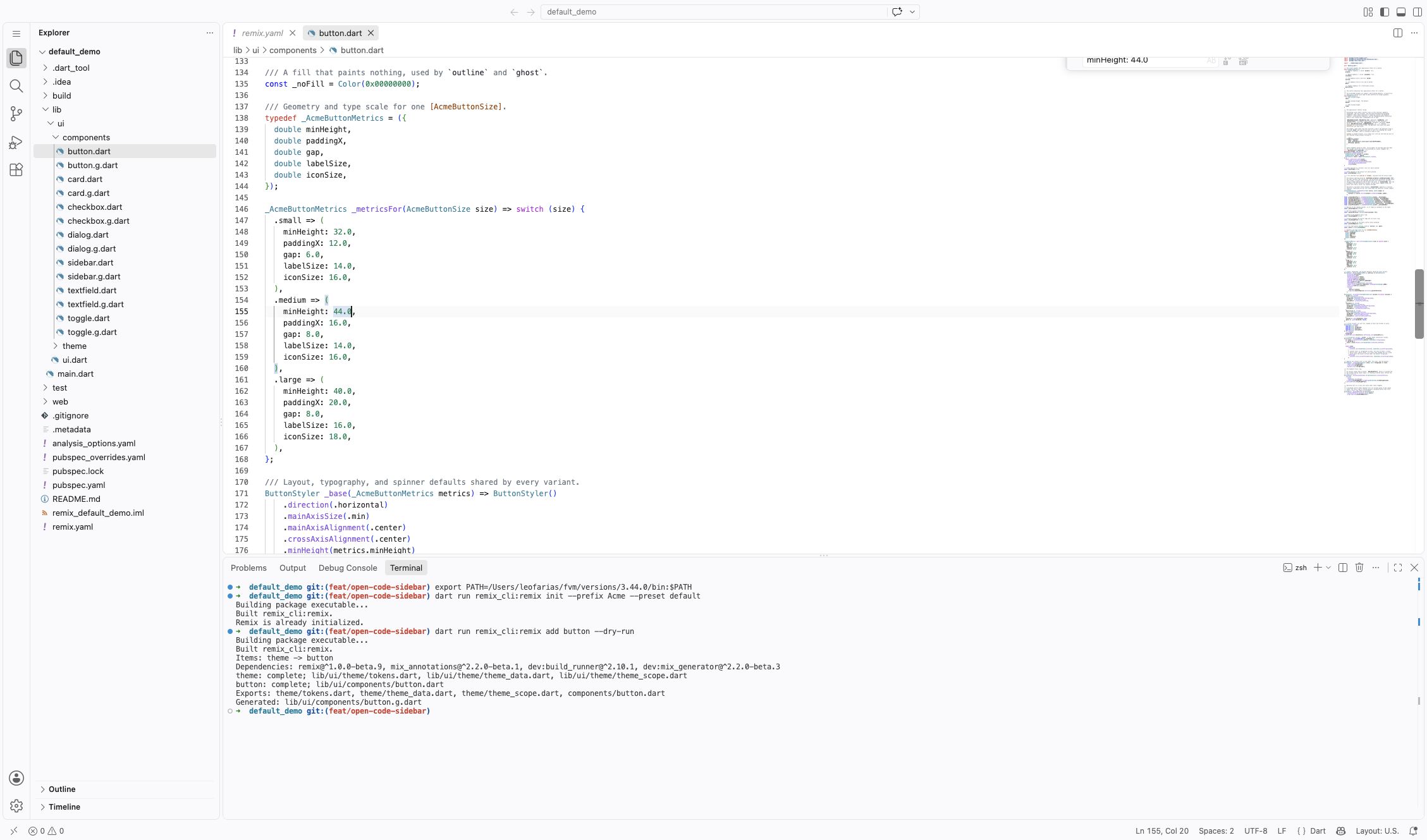
This changes a recipe value, not the generated widget signature. If you change recipe parameters, enums, or annotations, regenerate the adapter as described in the customization reference.
Check behavior and preserve edits
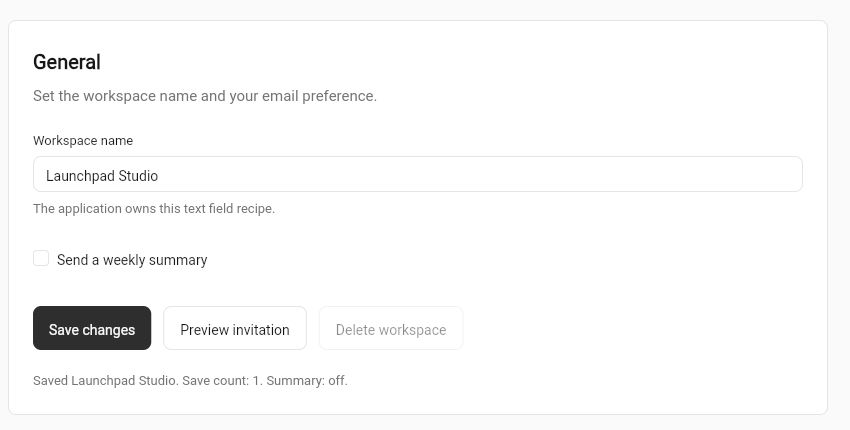
- Reload to reset local state. Enter Launchpad Studio as the workspace name.
- Clear Send a weekly summary, then press Save changes twice while loading.
- Confirm Save count: 1 and Summary: off when the save completes.
- Open and confirm the invitation dialog. Check that its result reaches the screen.
- Change the sidebar selection and test the preview button's callback.
Now compare your edited Button with its bundled recipe:
dart run remix_cli:remix add button --diffThe diff's current side contains your 44.0 edit; proposed contains the
bundled 36.0. The command does not replace your source. Repeat ordinary add:
dart run remix_cli:remix add buttonConfirm the medium height remains 44.0. --overwrite is an explicit
replacement operation; do not use it to inspect an update. See
source-preservation details before trying it.
Try Fortal separately
Do not switch the Vanilla project's preset. From its directory, create a second application:
cd ..
flutter create --empty --platforms=web remix_fortal_demo
cd remix_fortal_demo
Repeat the checkout override and CLI installation from the first step in this new project. Then initialize Fortal and install its recipes:
dart run remix_cli:remix init --prefix Acme --preset fortal
dart run remix_cli:remix add button
dart run remix_cli:remix add checkbox
dart run remix_cli:remix add textfield
dart run remix_cli:remix add dialog
dart run remix_cli:remix add card
dart run remix_cli:remix add sidebar
dart run remix_cli:remix add sidebar_layout
Replace this app's lib/main.dart with the complete Fortal source below, also
available as fortal_demo/lib/main.dart in the download.
import 'package:flutter/material.dart';
import 'package:remix/remix.dart';
import 'ui/ui.dart';
void main() => runApp(const SampleApp());
class SampleApp extends StatefulWidget {
const SampleApp({super.key});
@override
State<SampleApp> createState() => _SampleAppState();
}
class _SampleAppState extends State<SampleApp> {
AcmeThemeMode mode = AcmeThemeMode.system;
@override
Widget build(BuildContext context) {
return WidgetsApp(
title: 'Launchpad — fortal preset',
color: const Color(0xFFF8FAFC),
debugShowCheckedModeBanner: false,
pageRouteBuilder: <T>(settings, builder) => PageRouteBuilder<T>(
settings: settings,
pageBuilder: (context, animation, secondaryAnimation) =>
builder(context),
),
builder: (context, child) => AcmeScope(
theme: const AcmeThemeData.light(accent: AcmeAccentColor.violet),
darkTheme: const AcmeThemeData.dark(accent: AcmeAccentColor.violet),
mode: mode,
child: Builder(
builder: (context) {
final dark = AcmeTheme.of(context).brightness == Brightness.dark;
return DefaultTextStyle(
style: TextStyle(
fontSize: 14,
color: dark ? const Color(0xFFF1F1F1) : const Color(0xFF202020),
),
child: child!,
);
},
),
),
home: Builder(
builder: (context) {
final dark = AcmeTheme.of(context).brightness == Brightness.dark;
return WorkspacePage(
dark: dark,
onTheme: () => setState(
() => mode = dark ? AcmeThemeMode.light : AcmeThemeMode.dark,
),
);
},
),
);
}
}
class WorkspacePage extends StatefulWidget {
const WorkspacePage({super.key, required this.dark, required this.onTheme});
final bool dark;
final VoidCallback onTheme;
@override
State<WorkspacePage> createState() => _WorkspacePageState();
}
class _WorkspacePageState extends State<WorkspacePage> {
final name = TextEditingController(text: 'Launchpad');
bool summary = true;
bool saving = false;
int saves = 0;
String destination = 'settings';
String status = 'No changes saved yet.';
@override
void dispose() {
name.dispose();
super.dispose();
}
Future<void> save() async {
setState(() => saving = true);
await Future<void>.delayed(const Duration(milliseconds: 1500));
if (!mounted) return;
setState(() {
saving = false;
saves += 1;
status =
'Saved ${name.text}. Save count: $saves. Summary: ${summary ? 'on' : 'off'}.';
});
}
Future<void> invite() async {
final confirmed = await showRemixDialog<bool>(
context: context,
barrierLabel: 'Close invitation preview',
builder: (context) => Center(
child: AcmeDialog(
title: 'Invite a teammate',
description:
'This sample records your choice locally. It sends no invitation.',
actions: [
AcmeButton.outline(
label: 'Cancel',
onPressed: () => Navigator.pop(context, false),
),
AcmeButton.solid(
label: 'Confirm',
onPressed: () => Navigator.pop(context, true),
),
],
),
),
);
if (confirmed == true && mounted) {
setState(() => status = 'Invitation confirmed in this sample.');
}
}
@override
Widget build(BuildContext context) {
final foreground = widget.dark
? const Color(0xFFFAFAFA)
: const Color(0xFF171717);
final muted = widget.dark
? const Color(0xFFA3A3A3)
: const Color(0xFF737373);
final background = widget.dark
? const Color(0xFF0A0A0A)
: const Color(0xFFFAFAFA);
return DefaultTextStyle(
style: TextStyle(color: foreground, fontSize: 15, height: 1.5),
child: ColoredBox(
color: background,
child: SafeArea(
child: Row(
crossAxisAlignment: CrossAxisAlignment.stretch,
children: [
SizedBox(
width: 230,
child: AcmeSidebar<String>(
semanticLabel: 'Workspace navigation',
header: const Padding(
padding: EdgeInsets.all(24),
child: Text(
'LAUNCHPAD',
style: TextStyle(
fontSize: 18,
fontWeight: FontWeight.w700,
letterSpacing: 2,
),
),
),
sections: const [
RemixSidebarSection(
label: 'WORKSPACE',
destinations: [
RemixSidebarDestination(
value: 'overview',
label: 'Overview',
),
RemixSidebarDestination(
value: 'settings',
label: 'Settings',
),
RemixSidebarDestination(
value: 'billing',
label: 'Billing',
enabled: false,
),
],
),
],
selectedValue: destination,
onSelected: (value) => setState(() => destination = value),
footer: Text(
'fortal preset\nApplication-owned source',
style: TextStyle(fontSize: 12, color: muted),
),
),
),
Expanded(
child: SingleChildScrollView(
padding: const EdgeInsets.symmetric(
horizontal: 48,
vertical: 44,
),
child: Align(
alignment: Alignment.topLeft,
child: ConstrainedBox(
constraints: const BoxConstraints(maxWidth: 820),
child: Column(
crossAxisAlignment: CrossAxisAlignment.stretch,
children: [
Row(
children: [
Expanded(
child: Text(
'WORKSPACE / ${destination.toUpperCase()}',
style: TextStyle(
color: muted,
fontSize: 12,
letterSpacing: 1.5,
),
),
),
AcmeButton.outline(
label: widget.dark
? 'Use light theme'
: 'Use dark theme',
onPressed: widget.onTheme,
),
],
),
const SizedBox(height: 32),
Text(
destination == 'settings'
? 'Workspace settings'
: 'Workspace overview',
style: const TextStyle(
fontSize: 36,
fontWeight: FontWeight.w600,
height: 1.2,
),
),
const SizedBox(height: 12),
Text(
'A real Flutter application built from the fortal preset.',
style: TextStyle(color: muted),
),
const SizedBox(height: 32),
AcmeCard(
child: Column(
crossAxisAlignment: CrossAxisAlignment.stretch,
children: [
const Text(
'General',
style: TextStyle(
fontSize: 20,
fontWeight: FontWeight.w600,
),
),
const SizedBox(height: 8),
Text(
'Set the workspace name and your email preference.',
style: TextStyle(color: muted),
),
const SizedBox(height: 24),
AcmeTextField(
controller: name,
label: 'Workspace name',
semanticLabel: 'Workspace name',
helperText:
'The application owns this text field recipe.',
),
const SizedBox(height: 16),
AcmeCheckbox(
label: 'Send a weekly summary',
selected: summary,
onChanged: (value) =>
setState(() => summary = value ?? false),
),
const SizedBox(height: 24),
Wrap(
spacing: 12,
runSpacing: 12,
children: [
AcmeButton.solid(
label: 'Save changes',
loading: saving,
onPressed: save,
),
AcmeButton.outline(
label: 'Preview invitation',
onPressed: invite,
),
AcmeButton.outline(
label: 'Delete workspace',
enabled: false,
onPressed: () => setState(
() => status =
'ERROR: disabled action ran.',
),
),
],
),
const SizedBox(height: 20),
Semantics(
liveRegion: true,
child: Text(
status,
style: TextStyle(
color: muted,
fontSize: 13,
),
),
),
],
),
),
const SizedBox(height: 24),
AcmeCard(
child: Column(
crossAxisAlignment: CrossAxisAlignment.start,
children: [
const Text(
'One instance override',
style: TextStyle(
fontSize: 20,
fontWeight: FontWeight.w600,
),
),
const SizedBox(height: 8),
Text(
'This button uses the same recipe with a local style override.',
style: TextStyle(color: muted),
),
const SizedBox(height: 20),
AcmeButton.solid(
label: 'Run preview',
style: ButtonStyler()
.color(const Color(0xFF0E7490))
.label(.color(const Color(0xFFFFFFFF)))
.onPressed(
ButtonStyler().color(
const Color(0xFF164E63),
),
)
.onHovered(
ButtonStyler().color(
const Color(0xFF155E75),
),
)
.borderRadius(
.all(const Radius.circular(999)),
),
onPressed: () => setState(
() => status =
'Preview completed. The instance override keeps the callback.',
),
),
],
),
),
const SizedBox(height: 24),
Text(
'Source: lib/ui/ · Config: remix.yaml · Preset: fortal',
style: TextStyle(color: muted, fontSize: 12),
),
],
),
),
),
),
),
],
),
),
),
);
}
}The Fortal example uses AcmeScope and AcmeButton.solid, rather than
AcmeThemeScope and AcmeButton.primary. Keep its complete host configuration.
Do not apply the Vanilla preset's Button metrics edit to Fortal.
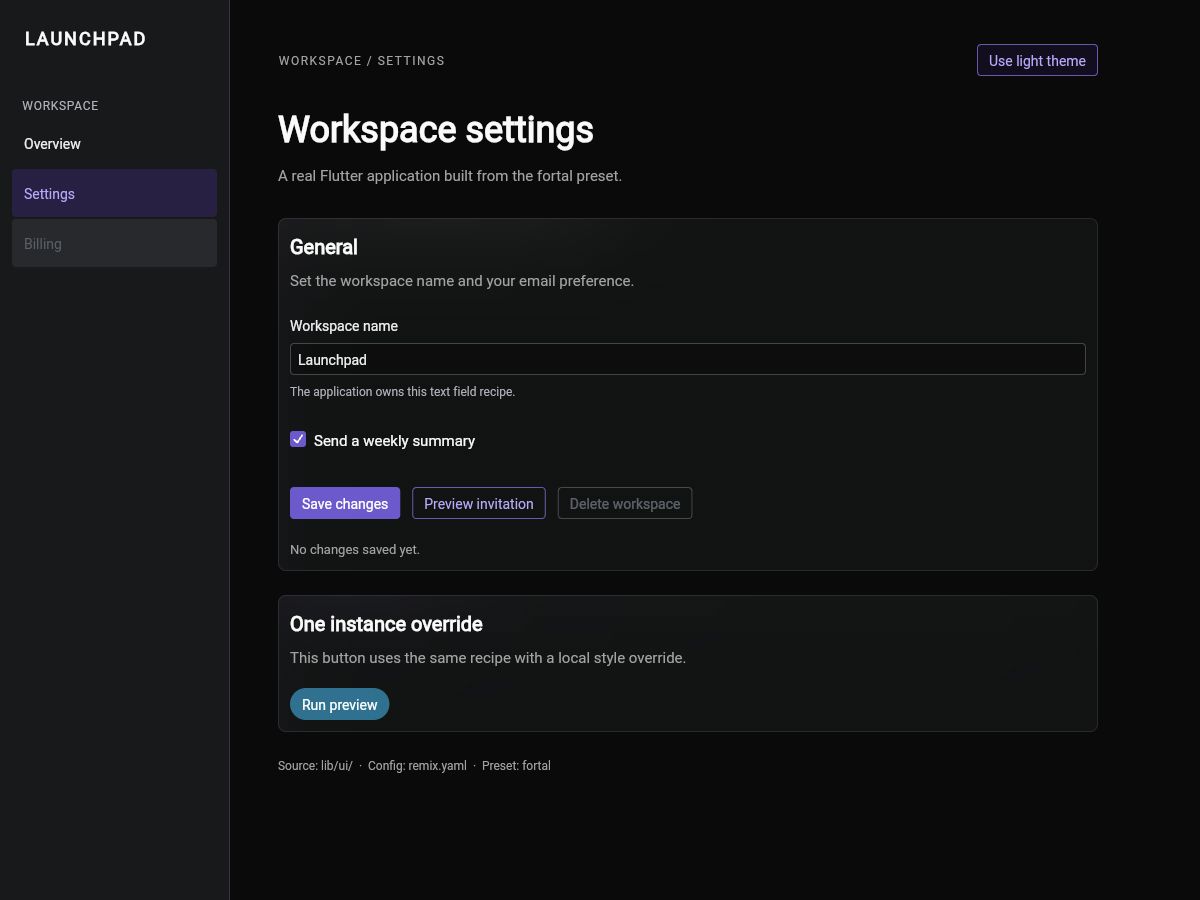
Fortal supplies a different theme and recipe vocabulary, not a second runtime
for your form. Repeat the same behavior checks. Neither preset adds a
remix_fortal package dependency to the consumer application.
Run the tests
Copy test/workflow_test.dart from the matching downloaded project into each
sample. Keep the project names used above; the tests import those names.
import 'package:flutter/material.dart';
import 'package:flutter/rendering.dart';
import 'package:flutter_test/flutter_test.dart';
import 'package:remix_default_demo/main.dart';

void main() {
  Future<void> start(WidgetTester tester) async {
    tester.view.physicalSize = const Size(1400, 1000);
    tester.view.devicePixelRatio = 1;
    addTearDown(tester.view.resetPhysicalSize);
    addTearDown(tester.view.resetDevicePixelRatio);
    await tester.pumpWidget(const SampleApp());
    await tester.pumpAndSettle();
    expect(find.byType(WidgetsApp), findsOneWidget);
    expect(find.byType(MaterialApp), findsNothing);
  }

  testWidgets(
    'the form saves once while loading and keeps the entered values',
    (tester) async {
      await start(tester);
      await tester.enterText(find.byType(EditableText), 'Launchpad Studio');
      await tester.tap(find.text('Send a weekly summary'));
      await tester.tap(find.text('Save changes'));
      await tester.pump(const Duration(milliseconds: 100));
      expect(find.textContaining('Save count:'), findsNothing);
      await tester.tap(find.text('Save changes'), warnIfMissed: false);
      await tester.pump(const Duration(milliseconds: 1600));
      await tester.pumpAndSettle();
      expect(
        find.text('Saved Launchpad Studio. Save count: 1. Summary: off.'),
        findsOneWidget,
      );
      expect(tester.takeException(), isNull);
    },
  );

  testWidgets(
    'disabled actions stay inactive and the instance override works',
    (tester) async {
      await start(tester);
      await tester.tap(find.text('Delete workspace'), warnIfMissed: false);
      await tester.pumpAndSettle();
      expect(find.text('ERROR: disabled action ran.'), findsNothing);
      await tester.tap(find.text('Run preview'));
      await tester.pumpAndSettle();
      expect(
        find.text(
          'Preview completed. The instance override keeps the callback.',
        ),
        findsOneWidget,
      );
      expect(tester.takeException(), isNull);
    },
  );

  testWidgets(
    'the dialog returns its result and the theme changes at runtime',
    (tester) async {
      await start(tester);
      await tester.tap(find.text('Use dark theme'));
      await tester.pumpAndSettle();
      expect(find.text('Use light theme'), findsOneWidget);
      await tester.tap(find.text('Preview invitation'));
      await tester.pumpAndSettle();
      expect(find.text('Invite a teammate'), findsOneWidget);
      final title = tester.renderObject<RenderParagraph>(
        find.text('Invite a teammate'),
      );
      expect(
        title.text.style?.decoration?.contains(TextDecoration.underline) ??
            false,
        isFalse,
      );
      await tester.tap(find.text('Confirm'));
      await tester.pumpAndSettle();
      expect(find.text('Invite a teammate'), findsNothing);
      expect(find.text('Invitation confirmed in this sample.'), findsOneWidget);
      expect(tester.takeException(), isNull);
    },
  );

  testWidgets(
    'Sidebar changes the destination and skips the disabled destination',
    (tester) async {
      await start(tester);
      await tester.tap(find.text('Overview'));
      await tester.pumpAndSettle();
      expect(find.text('Workspace overview'), findsOneWidget);
      await tester.tap(find.text('Billing'), warnIfMissed: false);
      await tester.pumpAndSettle();
      expect(find.text('Workspace overview'), findsOneWidget);
      expect(tester.takeException(), isNull);
    },
  );
}import 'package:flutter/material.dart';
import 'package:flutter/rendering.dart';
import 'package:flutter_test/flutter_test.dart';
import 'package:remix_fortal_demo/main.dart';
void main() {
Future<void> start(WidgetTester tester) async {
tester.view.physicalSize = const Size(1400, 1000);
tester.view.devicePixelRatio = 1;
addTearDown(tester.view.resetPhysicalSize);
addTearDown(tester.view.resetDevicePixelRatio);
await tester.pumpWidget(const SampleApp());
await tester.pumpAndSettle();
expect(find.byType(WidgetsApp), findsOneWidget);
expect(find.byType(MaterialApp), findsNothing);
}
testWidgets(
'the form saves once while loading and keeps the entered values',
(tester) async {
await start(tester);
await tester.enterText(find.byType(EditableText), 'Launchpad Studio');
await tester.tap(find.text('Send a weekly summary'));
await tester.tap(find.text('Save changes'));
await tester.pump(const Duration(milliseconds: 100));
expect(find.textContaining('Save count:'), findsNothing);
await tester.tap(find.text('Save changes'), warnIfMissed: false);
await tester.pump(const Duration(milliseconds: 1600));
await tester.pumpAndSettle();
expect(
find.text('Saved Launchpad Studio. Save count: 1. Summary: off.'),
findsOneWidget,
);
expect(tester.takeException(), isNull);
},
);
testWidgets(
'disabled actions stay inactive and the instance override works',
(tester) async {
await start(tester);
await tester.tap(find.text('Delete workspace'), warnIfMissed: false);
await tester.pumpAndSettle();
expect(find.text('ERROR: disabled action ran.'), findsNothing);
await tester.tap(find.text('Run preview'));
await tester.pumpAndSettle();
expect(
find.text(
'Preview completed. The instance override keeps the callback.',
),
findsOneWidget,
);
expect(tester.takeException(), isNull);
},
);
testWidgets(
'the dialog returns its result and the theme changes at runtime',
(tester) async {
await start(tester);
await tester.tap(find.text('Use dark theme'));
await tester.pumpAndSettle();
expect(find.text('Use light theme'), findsOneWidget);
await tester.tap(find.text('Preview invitation'));
await tester.pumpAndSettle();
expect(find.text('Invite a teammate'), findsOneWidget);
final title = tester.renderObject<RenderParagraph>(
find.text('Invite a teammate'),
);
expect(
title.text.style?.decoration?.contains(TextDecoration.underline) ??
false,
isFalse,
);
await tester.tap(find.text('Confirm'));
await tester.pumpAndSettle();
expect(find.text('Invite a teammate'), findsNothing);
expect(find.text('Invitation confirmed in this sample.'), findsOneWidget);
expect(tester.takeException(), isNull);
},
);
testWidgets(
'Sidebar changes the destination and skips the disabled destination',
(tester) async {
await start(tester);
await tester.tap(find.text('Overview'));
await tester.pumpAndSettle();
expect(find.text('Workspace overview'), findsOneWidget);
await tester.tap(find.text('Billing'), warnIfMissed: false);
await tester.pumpAndSettle();
expect(find.text('Workspace overview'), findsOneWidget);
expect(tester.takeException(), isNull);
},
);
}Replace analysis_options.yaml with the reviewed configuration:
include: package:flutter_lints/flutter.yaml

analyzer:
  exclude:
    - lib/ui/**/*.g.dart
This excludes generated adapters from the pinned generator's lint findings, not your authored recipes. Run from each sample directory:
flutter analyze
flutter test
flutter build web --release
Each sample has four tests covering form/save behavior, disabled controls, callbacks, dialog results and text decoration, and sidebar selection. Fix failures before treating a screenshot as evidence that the sample works.
Troubleshooting and evidence
- Pub cannot resolve beta.10: check the absolute checkout path in
pubspec_overrides.yaml. - Missing generated class: inspect the add command's generation error and the recipe's
partdeclaration. - Missing overlay or incorrect dialog text: restore the complete sample's application host and scope placement.
- No
primaryconstructor: use the Vanilla sample, which this pinned walkthrough selects asdefault, or thesolidconstructor withfortal.
See the Open Code reference for configuration and command details.
Screenshots were captured from Flutter release web builds and an editor during the September 7 review. They show desktop states, not certification of all components or platforms. Recorded evidence tracks their hashes and source checkout. Assets and evidence remain alongside this documentation. Source panels above are expanded from the same archive during the documentation build, not maintained as separate copies.